Quick answer
What photo does COVA accept?
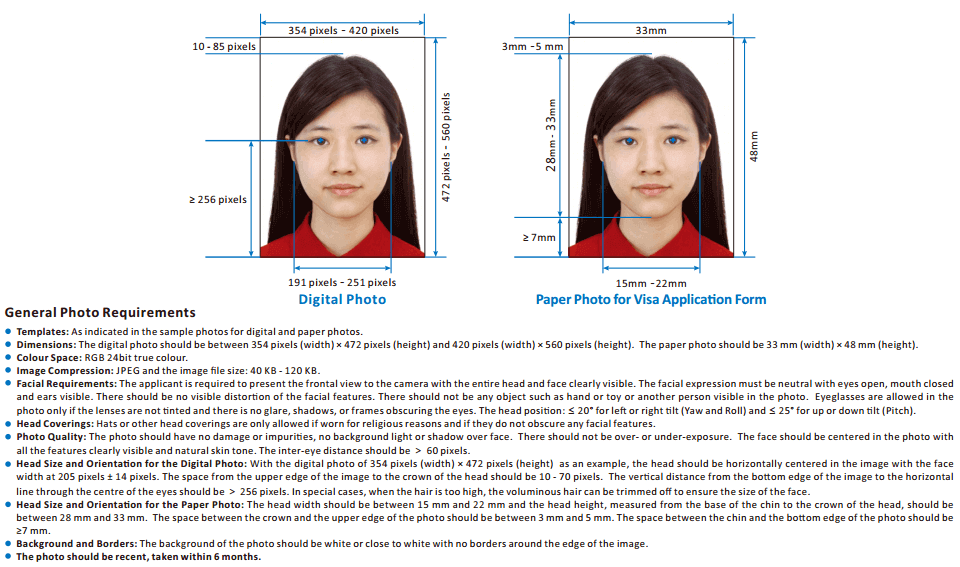
COVA, China's online visa application, needs a colour JPEG 354–420 pixels wide and 472–560 pixels high, of 40–120 KB, on a white or near-white background. Its crop tool needs an original of at least 354 × 472 pixels, and on a 354 × 472 photo the face should be about 205 ± 14 pixels wide.
COVA, the Ministry of Foreign Affairs' China Online Visa Application at consular.mfa.gov.cn/VISA, asks for a recent colour photo, front view and bareheaded, with a white background. The file must be a JPEG between 354 × 472 and 420 × 560 pixels, in 24-bit RGB colour and 40–120 KB, taken within the last 6 months.
Photo rules appear in the form's "Photo requirements" sheets, and the photo step has a built-in crop tool with its own limits. Both are summarised below. The print rules for the paper photo are in the China visa photo guide.
COVA photo file requirements
| Pixel size | 354–420 px wide × 472–560 px high |
|---|---|
| Colour | RGB, 24-bit true colour |
| Format and file size | JPEG, 40–120 KB |
| Background | White or close to white, no border |
| Photo age | Taken within the last 6 months |
| Expression | Neutral, eyes open, mouth closed, ears visible |
| Head position | No more than 20° turn or tilt to either side and 25° up or down |
Head size and position in pixels
COVA gives its head measurements on a 354 × 472 pixel example. If your photo is larger, scale them up in proportion: the sheet's template shows a face width of 191–251 pixels across the 354–420 pixel range.
| Face width | 205 ± 14 px (191–219 px), centred horizontally |
|---|---|
| Top of the head | 10–70 px below the top edge |
| Eye line | More than 256 px above the bottom edge |
| Distance between the eyes | More than 60 px |
| Very high hair | May be cropped off so the face stays the right size |
Print layout for comparison
On the 33 × 48 mm paper photo, the same sheet asks for a head 15–22 mm wide and 28–33 mm from chin to crown, 3–5 mm of space above the crown and at least 7 mm below the chin.
Using the COVA crop tool
The photo step lets you choose an image and crop it in the browser. The tool's help text says:
- Start big enough. The image must allow a crop of more than 354 × 472 pixels around your head, and images smaller than 354 × 472 pixels are refused.
- JPEG only. The crop tool accepts JPEG images. (COVA's general document upload accepts jpg, jpeg and png files.)
- Fill the guide box. Rotate the photo if needed so your head is upright, drag the box to line up with your outline, and use the zoom slider so the area from chin to crown sits between the small and large ovals.
- Preview, then crop. Save and preview the crop, then click the crop button: the tool closes and uploads the cropped photo automatically. The tool will not crop an image that does not fill the guide box.
Fixing a failed upload
If the photo will not upload, check three things: it is a JPEG and not a PNG, HEIC or screenshot; it is at least 354 × 472 pixels; and, if you cropped it yourself, the saved file is 40–120 KB. Re-save from the original photo rather than compressing the same file again, which adds blur and blockiness.
What COVA rejects
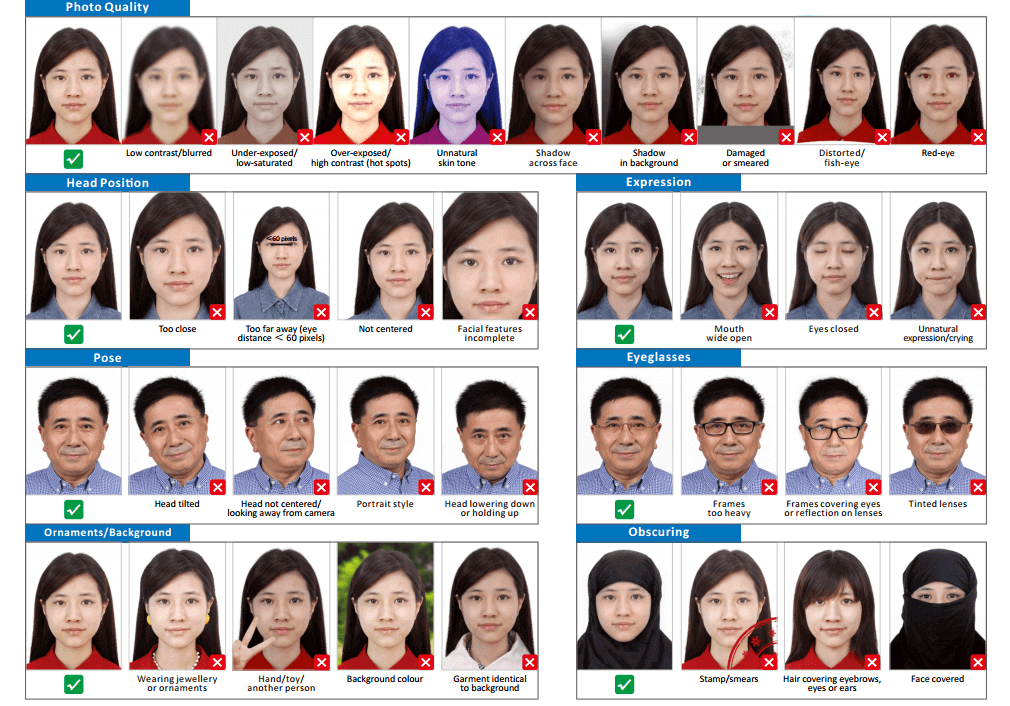
COVA's second requirement sheet shows about 30 rejected examples. They fall into five groups:
- Exposure and quality: low contrast or blur, under- or over-exposure, hot spots, unnatural skin tone, red-eye, distortion, damage or smears.
- Framing: too close, too far (eyes less than 60 pixels apart), not centred, or part of the face cut off.
- Pose and expression: eyes closed, mouth wide open, crying or an unnatural expression, head tilted, raised or lowered, looking away, or a "portrait style" pose.
- Glasses and accessories: heavy frames, frames over the eyes, reflections, tinted lenses, jewellery or ornaments.
- Background and covering: a coloured background, shadows behind you, clothes the same colour as the background, a hand, toy or another person, hair over the eyebrows, eyes or ears, or anything covering the face.


How to upload your photo to COVA
- Take or choose a recent photo. Use a colour photo from the last 6 months, taken against a white wall with even light, a neutral expression and both ears visible.
- Check the original size. Make sure the image is a JPEG of at least 354 × 472 pixels, with room around your head for cropping. If the file is not a JPG, such as a HEIC photo from an iPhone, convert it with the free 123PhotoTool JPEG converter.
- Open the photo step and crop. Choose the photo, rotate it upright if needed, then zoom until your chin-to-crown area sits between the two ovals.
- Preview and upload. Preview the crop and confirm it: the tool uploads the cropped photo for you.
- Keep a matching print. If your visa centre asks for a paper photo, print the same photo at 33 × 48 mm on glossy paper.
COVA photo FAQ
Between 354 × 472 and 420 × 560 pixels (width × height), in 24-bit RGB colour, saved as a JPEG of 40–120 KB.
Yes, if you use COVA's crop tool: it needs an original large enough to crop more than 354 × 472 pixels around your head, and it rejects anything smaller. The tool then crops and uploads the photo for you.
COVA's general file upload accepts jpg, jpeg and png, but its photo crop tool says it accepts JPEG images only, and the required photo format is JPEG. Save your photo as a JPEG.
Centred, with the face about 205 ± 14 pixels wide, the top of the head 10–70 pixels below the top edge, and the line through your eyes more than 256 pixels above the bottom edge. Your eyes should be more than 60 pixels apart.
Often yes. Many visa centres also ask for a printed 33 × 48 mm photo on glossy paper, and they do not agree on how many. See the China visa photo guide.
Uploading a photo does not mean it has been approved: visa officers still check it. The usual reasons are on our rejected photo page.
Official sources
- Ministry of Foreign Affairs: China Online Visa Application (COVA), photo requirements and crop tool
- China Consular Services: China Online Visa Application
- Chinese Visa Application Service Centre, Sydney: photo FAQ
- Chinese Embassy in the US: Requirements and Procedures for Chinese Visa Application
Last checked . Requirements and fees can change, so always confirm with the issuing agency before you apply. This site is independent and not affiliated with any government agency.