Quick answer
Why was my Chinese visa or passport photo rejected?
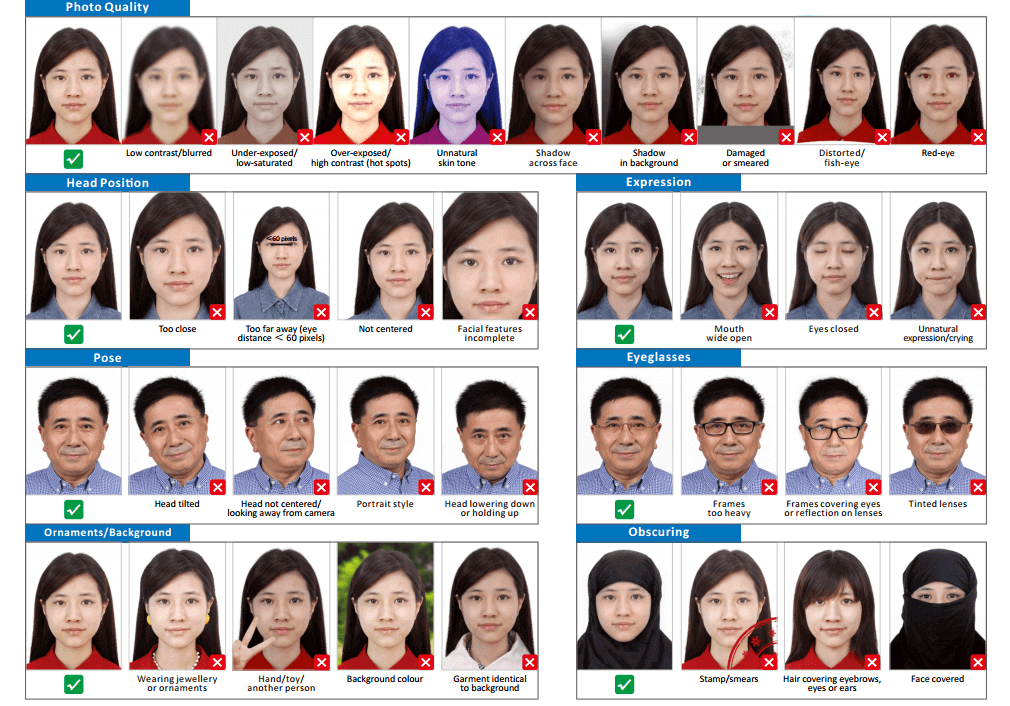
Common reasons in the official lists are a background that is not white, a head that is too big, too small or tilted, shadows or bright spots on the face, glare or tinted lenses, hair covering the eyebrows, eyes or ears, clothing the same colour as the background, and retouched or blurred photos.
Most rejected Chinese passport and visa photos fail on a few points: a background that is not white, a head that is too big, too small or tilted, shadows or glare, hair over the eyebrows or ears, a white top on a white background, or a photo that is retouched, blurred or older than 6 months. Each is easy to fix with a retake.
The lists below combine the rejection examples published by COVA (the MFA's online visa system), the MFA's e-passport photo spec for the 中国领事 app, NIA's exit-entry photo guide and the Chinese Embassy in Switzerland's notes on the selfies it sends back.
Faults and fixes
| Fault | Listed by | Fix |
|---|---|---|
| Background not white, gradient or cluttered | COVA, MFA, NIA, Swiss embassy | Stand in front of a plain white wall, about a metre away |
| Shadow on the face or background | COVA, MFA, NIA, Swiss embassy | Face a window or use two soft lights, one each side |
| Too dark, too bright or bright spots | COVA, MFA, NIA | Use soft, even light and no direct flash |
| Head too big, too small or off-centre | COVA, NIA, Swiss embassy | Re-crop from the original to the right head height |
| Head tilted, raised, lowered or turned | COVA, MFA, NIA, Swiss embassy | Sit upright, shoulders level, and look straight at the lens |
| Eyes closed or teeth showing | COVA, MFA, NIA | Keep your eyes open and your mouth closed |
| Hair over the eyebrows, eyes or ears | COVA, MFA, NIA, Swiss embassy | Pin your hair back and tuck it behind your ears |
| Tinted lenses, heavy frames or glare | COVA, MFA, NIA, Swiss embassy | Take your glasses off, or tilt them slightly to remove glare |
| Clothing the same colour as the background | COVA, NIA, Swiss embassy | Wear a dark top, ideally with a collar |
| Hat, headband, scarf or high hair bun | MFA, NIA | Remove it, unless it is worn for religious, medical or cultural reasons |
| Jewellery or ornaments | COVA, NIA | Take off earrings, face stickers and hair ornaments |
| Hand, toy or another person | COVA, MFA, NIA | Make sure only you are in the photo |
| Blur, red-eye, distortion or colour cast | COVA, MFA, NIA | Use a sharp camera at arm's length or more, without a wide-angle lens |
| Damage, stains, stamps or a border | COVA, MFA, NIA | Print a fresh copy on photo paper |
| Heavy make-up or retouching | MFA, NIA | Use an unedited photo with no beauty filter |
What the most common faults look like



Upload and file problems
- COVA: the photo must be a JPEG of 354–420 × 472–560 pixels and 40–120 KB, and the crop tool refuses images smaller than 354 × 472 pixels. Details are on the COVA upload page.
- 中国领事 app: the Swiss embassy says uploads fail if the file is over 5 MB, not a JPG or PNG, or the network drops. The MFA spec asks for a JPEG of 30–80 KB.
- In China: NIA's standard asks for a JPEG of 20–80 KB in 24-bit colour, and a scan of a paper photo at 300 dpi or more.
The app check is only a guide
The Swiss embassy says the 中国领事 app's automatic check is for reference. Photos it flags include ones that are too dark, stained, show a light-coloured top or a bare chest, are low resolution, or have the head, eyebrows, eyes or ears cut off or covered. If yours has none of these faults, tap "下一步" and an officer will review it.
After a rejection
- Visa applications: upload a new photo in COVA, and bring new prints if your visa centre asks. The Sydney visa centre says an application may be declined if the photo fails.
- 中国领事 app: if the embassy asks for a new photo after its first review, upload it under the supplementary materials the embassy asks for.
- In China: many exit-entry offices work with approved studios that upload photos and give you a receipt (回执). A studio retake is usually the quickest fix.
Always retake from scratch
Editing a rejected photo rarely works: brightening a dark photo adds noise, and cropping a small photo makes it blurry. Take a new photo in better light and crop it from the original file.
How to fix a rejected Chinese passport or visa photo
- Find the fault. Compare your photo with the table above: background, light, head size and tilt, hair, glasses, clothing and image quality.
- Retake it in better conditions. Stand in front of a plain white wall facing a window, wear a dark top, tuck your hair behind your ears and remove your glasses.
- Crop it from the original. Crop the new photo to 33 × 48 mm with the right head height for your document, without retouching.
- Save the right file. Save a JPEG at the size your system asks for: 40–120 KB for COVA, 30–80 KB for the 中国领事 app, or 20–80 KB under NIA's standard. If the file is not a JPG, such as a HEIC photo from an iPhone, convert it with the free 123PhotoTool JPEG converter.
Rejected photo FAQ
Not necessarily. The Swiss embassy says the app's check is for reference only. If you are sure the photo meets the rules, tap "下一步" (next) and wait for manual review. If the embassy then asks for a new photo, upload it as a supplementary document.
The crop tool needs a JPEG large enough to crop more than 354 × 472 pixels around your head, and it will not crop an image that does not fill its guide box. Use the original photo, not a screenshot or a small copy. See the COVA upload guide.
Yes. The Sydney Chinese Visa Application Service Centre says an application may be declined if the photo does not meet the requirements.
No. NIA forbids retouching your features, such as scars, moles or your hairstyle, and the MFA spec forbids editing and composite photos. Beauty filters count as retouching.
Each photo must be taken within the last 6 months, and the rules differ between documents: NIA accepts light grey or light blue backgrounds for documents issued in China, but COVA and the 中国领事 app need white.
Official sources
- Ministry of Foreign Affairs: China Online Visa Application (COVA), photo requirements
- Ministry of Foreign Affairs, China Consular Services: 电子护照人像照片规格要求 (e-passport photo specification)
- National Immigration Administration: 出入境证件相片照相指引 (exit-entry photo guide)
- Chinese Embassy in Switzerland: 中国领事 app guide and FAQ (December 2024)
- Chinese Visa Application Service Centre, Sydney: photo FAQ
Last checked . Requirements and fees can change, so always confirm with the issuing agency before you apply. This site is independent and not affiliated with any government agency.